
HDC Handbook
Board, Layers & Notation
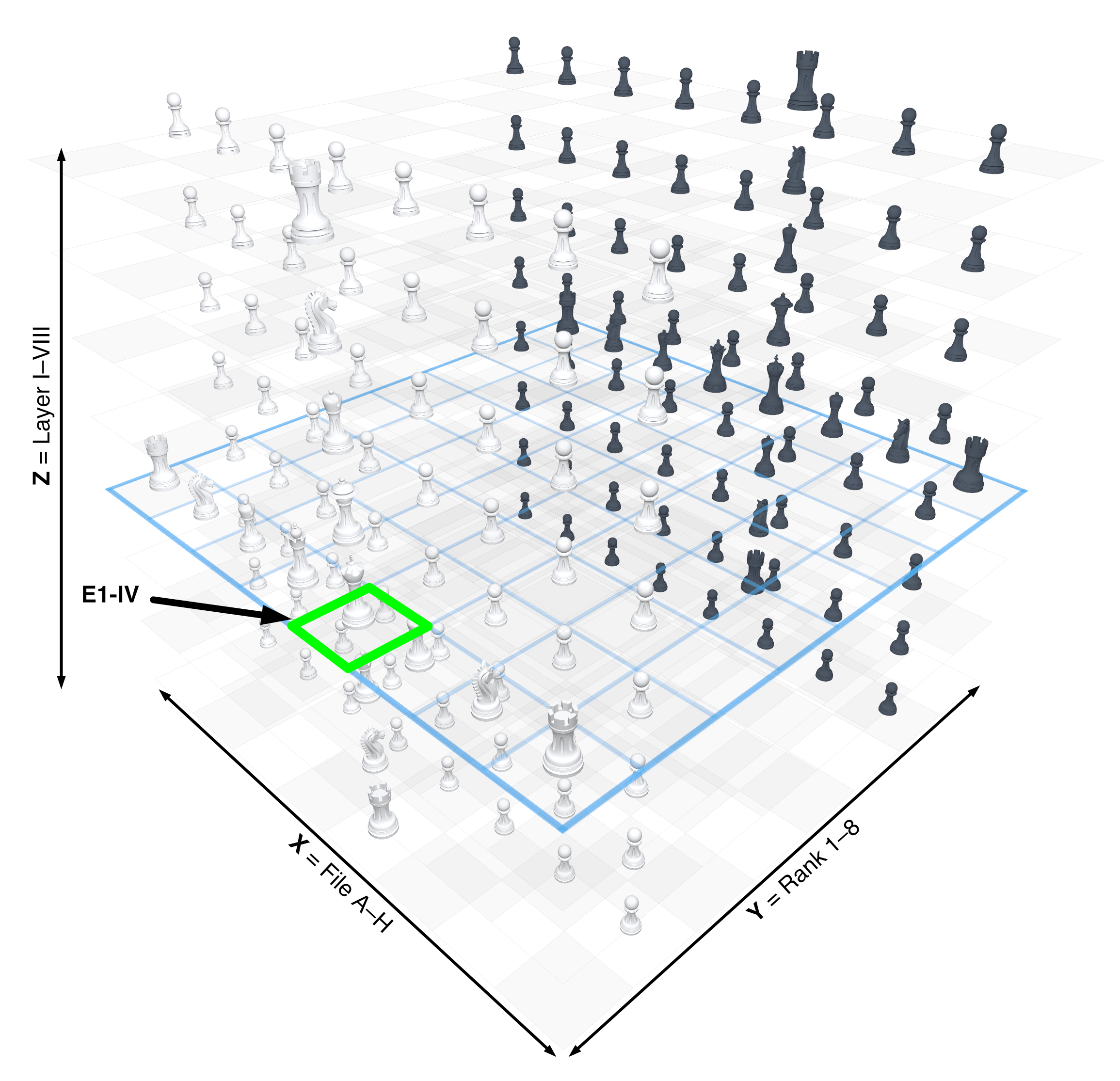
In HDC every position is described in three-dimensional space. To keep orientation manageable, the game uses a clear coordinate system.
This page explains the playing space, the layers, the key square names, and the basic idea of notation.
The playing space
HDC is played on a fixed 3D grid:
- 8 files: A to H
- 8 ranks: 1 to 8
- 8 layers: I to VIII
Together that makes 512 squares.
How to read a square
A square is written with three parts:
- file
- rank
- layer
Examples:
E1–IVA8–IC5–VI
This is practical because a square in HDC is no longer located only on a board. It also has a height in space.
The axes in simple terms
X-axis
These are files A to H.
Y-axis
These are ranks 1 to 8.
Z-axis
These are layers I to VIII.
The reference layer IV
A special role is played by layer IV. It is the most important reference layer and in many situations feels like the classical board at the center of the cube.
That is why layer IV appears so often in examples.
Orientation from White’s side
The orientation is fixed:
A1–Iis front-left-bottomH8–VIIIis back-right-top
The coordinate system does not rotate with the player.
Color parity in space
Square color still matters in 3D, especially for bishops and knights. The square color follows from file, rank, and layer together. For regular players, the important practical points are:
- bishops remain color-bound
- knights change square color with every move
- pawns behave differently depending on how they move
You do not need to calculate this during normal play, but it helps to know that the color structure inside the cube is systematic.
Why notation matters in HDC
With the added layer dimension, precise square names are even more useful than in classical chess.
Notation helps you:
- read examples clearly
- understand special rules
- record moves unambiguously
- share or save positions
Short notation examples
e4–IVfor a pawn moveDf4–VIfor a Duke move in English notationO-Ofor short horizontal castlingO-Ozfor lower Z-castlinge5–Vxe6–IV e.p.for an en passant example with a layer change
Canonical piece letters
HDC uses the same piece letters in English and German pages. Piece names may be localized; notation letters stay canonical English.
- King = K
- Queen = Q
- Duke = D
- Rook = R
- Bishop = B
- Knight = N
HDC-FEN and saved positions
HDC uses its own position format called HDC-FEN. This format can describe all layer contents, the side to move, castling rights, en passant targets, and further state data.
For players, this becomes especially useful once example files are available to download.
Coordinates in the image
The diagram shows how file, rank, and layer define one square together. A square is not just on a board; it has one exact position inside the cube.
FileView as a file slice
A FileView slice fixes one file, for example E, and shows the relationship between ranks and layers. This is especially useful for reading vertical structures such as the noble column.

Mini FAQ
Do I need to memorize all coordinates?
No. For the beginning it is enough to read square names and understand layers.
Why are Roman numerals used for layers?
Because they clearly separate layers from ranks in the written notation.
Is layer IV always important?
Yes. It is the central reference layer in HDC.
Is notation only for advanced players?
No. Even reading examples and rules becomes easier right away.